
Copy the previous year's template and manually update every plan, tier, benefit and rule.
For Third-Party Administrators
Your plan docs are costing you
Your plan docs are costing you
more than you realize.
Every renewal, your team loses hours rekeying plan data, chasing employer approvals, and fixing claim errors caused by outdated documents. Enter your own numbers to see what it costs you each year.
SOC 2 Type II · ERISA-aligned · Trusted by TPAs and self-insured plans
Compliance and certification
SOC 2 Type II certified
HIPAA-minded by design
Built for ERISA recordkeeping
The Old Way
A new plan year shouldn't mean starting over.
Copy, paste, email, repeat.
Every year, plan updates get trapped in Word templates and lost in comment threads. The final headache? Manually converting that document so your claims system can actually read it.
It works.
It just takes far too much work.
Where the manual process costs time
Email documents to employers, consultants, legal and other approvers. Wait. Follow up. Repeat.
Compare versions by opening documents side by side and hunting through pages and tables.
Once everyone finally agrees, the approved plan still has to be translated into the systems that run the plan.
Save time. Save complaints. Use Smart Plan Doc.
Where the Money Goes
Where manual plan document work costs your TPA time and money.
These are the six recurring cost categories. The calculator below estimates them from your own numbers.
Annual Plan Renewal Rekeying
Staff manually re-enter benefit data, cost-share rules, and coverage limits every renewal cycle — often across 200 separate documents from prior-year Word templates.
Eliminated with Smart Plan Doc
Employer Review & Approval Cycles
Each round of employer feedback requires exporting a new document version, emailing it, waiting for replies, reconciling comments, and re-exporting. The cycle repeats for every round of changes.
Replaced by in-app workflow
Claim Rework from Document Errors
Adjusters running claims against stale or mismatched plan docs trigger denials, appeals, and manual overrides. Every rework incident takes staff time away from processing new claims.
Prevented at source
ERISA Compliance & Audit Preparation
DOL audits require current SPD versions, SMM tracking, and participant distribution proof. Without a structured audit trail, TPAs spend days reconstructing records under deadline pressure.
Automated audit trail
Mid-Year Amendment Processing
Carrier updates, regulatory changes, and employer requests trigger mid-year edits. Each amendment must be manually propagated across all affected document versions and re-distributed.
Single-edit propagation
Document Version & Distribution Control
Tracking which employer has which version, ensuring the right SPD reaches participants, and maintaining proof of delivery is a constant coordination burden across email and shared drives.
Centralized & tracked
Estimate your own cost
Example values. Replace them with your own.
Your estimated annual cost
$0 / yr
0 staff hours per year
| Category | Hours | Cost |
|---|---|---|
| Annual Plan Renewal Rekeying | 0 | $0 |
| Employer Review & Approval Cycles | 0 | $0 |
| Claim Rework from Document Errors | 0 | $0 |
| ERISA Compliance & Audit Preparation | 0 | $0 |
| Mid-Year Amendment Processing | 0 | $0 |
| Document Version & Distribution Control | 0 | $0 |
0 hours · $0 per year recoverable
This estimate uses only the numbers you enter. The percentage is your assumption, not a Smart Plan Doc benchmark. In a pilot, we measure real before-and-after results on your own plans.
How Smart Plan Doc addresses ERISA compliance
ERISA requires plan sponsors and TPAs to maintain current Summary Plan Descriptions, track Summary of Material Modifications, and prove timely participant distribution. Smart Plan Doc creates a versioned, timestamped audit trail of every document approval — who reviewed it, when they approved it, and what version participants received. During a DOL audit, that record is one export, not a multi-day reconstruction from email archives.
A Better Way
One plan. One workspace. One version of the truth. Smart Plan Doc.
Smart Plan Doc replaces the scattered tools and handoffs around plan documents with one connected workspace.
Your plan starts as a document. It becomes structured data.
Your team works on the plan itself, not another Word file.
Edit benefits, tiers, cost share, eligibility, exclusions, limits and prior authorization without rebuilding a document.
Send an employer or approver into the exact plan version that needs review. Comments stay attached to the benefit or service they refer to.
Create the next plan year from the previous version instead of starting with a blank Word document.
The Smart Plan Doc Lifecycle
From last year's document to next year's live plan.
Smart Plan Doc connects the work that used to happen across Word, email, spreadsheets and downstream systems.
The six lifecycle stages
- Ingest
- Build
- Review
- Approve
- Generate
- Deploy
01 - Ingest
Upload the plan document you already have.
Smart Plan Doc reads the .docx and structures plans, tiers, benefits, services, exclusions, eligibility, limits and prior authorization requirements.
02 - Build
Start from the existing plan and make the changes for the new year.
Clone a version, change cost share, add or remove benefits, update tiers and modify plan rules.
03 - Review
Send the plan to the people who need to review it.
Comments stay attached to the exact benefit, service or rule they refer to.
04 - Approve
Once everyone agrees, the plan can be approved and electronically signed.
The approval history, comments and version stay together.
05 - Generate
Generate the documents your group needs.
Use your templates to produce SPD, SOB, SBC and other plan documents using approved plan data.
06 - Deploy
Map, validate and move the approved plan into the claims environment.
Benefit and service codes are mapped, the plan is validated, and the approved plan is built into the TPA's claims adjudication environment.
Changes requested, back to Review
Plan Build
Map every benefit to its codes. Build a plan claims can actually adjudicate.
The Plan Build module connects your structured plan data directly to the claims environment — mapping each benefit to CPT, HCPCS, ICD-10 and CDT code ranges, validating coverage rules, and deploying a plan that adjudicates correctly from day one.
Every benefit mapped. Every code validated. No guesswork.
Smart Plan Doc displays all plan benefits — Medical, Dental, Vision — and flags each one until its code ranges are mapped and confirmed. A live progress counter shows exactly how far through the build your team is, and the "Show unmapped only" filter keeps focus on what remains.
- ✓ Supports CPT, HCPCS, CDT, ICD-10-CM, MODIFIER and ESRDCB code types in one mapping panel
- ✓ Code ranges (From / To) cover broad procedure families with a single mapping row
- ✓ In-Network and Out-of-Network coverage rules set per benefit at the code level
- ✓ Linked document rules — Exclusions, Eligibility, Limits, Prior Auth — attach directly to each mapped code
- ✓ Status moves automatically from CodeMappingPending to Complete when all benefits are mapped
One panel. Every code type. From ICD-10 to CDT.
Click any benefit to open the code mapping panel inline. Select the code type, enter the code range, set cost share by tier, and attach the plan document rules that govern this benefit — all without leaving the page.
Code Types
CPT · HCPCS · CDT
ICD-10-CM · MODIFIER
ESRDCB · HPCSSIG
Document Rules
Exclusions · Eligibility
Limits · Prior Auth
attached per code
Coverage Tiers
In-Network and
Out-of-Network COVERED
set per code row
Exclusions
Per-code exclusion
checkbox keeps specific
codes out of coverage
Plan Build Status
77 benefits mapped
Status: Complete — ready to deploy
100%
Benefits Mapped
7
Code Types Used
0
Errors / Warnings
Day 1
Clean Adjudication
The Platform
Everything around the plan document, in one place.
The AI reads the document before your team touches it.
Upload last year's .docx. Smart Plan Doc extracts your plan data in minutes — and flags errors that would have caused claim denials before a single staff member opens the file.
- 178-page documents processed in under 10 minutes — plans, tiers, benefits, exclusions, limits, and prior auth rules extracted automatically.
- AI catches document errors automatically — malformed EINs, corrupted benefit text, wrong page numbers in the table of contents, invalid phone numbers.
- Errors surface before adjudication, not after a member gets wrongly denied and appeals.
Your staff reviews what matters. The AI handles the rest.
AI Ingest SummaryABC Staffing, 2026 SPD.docx
Malformed EIN'45-556756' has 8 digits, not 9 — IRS requires 9Error
Corrupted benefit titleCover page reads 'enrollmentHealth' — merged textError
TOC pagination mismatchTable of contents page numbers broadly incorrectWarning
Invalid phone numberCustomer service number has too many digitsWarning
All flagged before a claim is ever submitted against this plan.
Make changes to the plan, not the Word document.
Change cost share. Add a tier. Modify an exclusion. Update eligibility. Change a prior authorization rule. Save it as a new version while the original remains intact.
- Clone any version to launch a new plan year from your last approved baseline.
- The root version stays untouched, preserving a permanent source of truth for compliance and auditing.
- Edit granular details at any level—from entire plan structures down to a single copay or rule.
Keep the source. Build the next version. Know exactly what changed.
Version historyAcme Manufacturing
- v1 · Source documentIngested from 2025 SPD.docxRoot
- v2 · 2026 plan yearCloned from v1, approvedApproved
- v3 · Mid-year amendmentBehavioral health benefit addedApproved
- v4 · 2027 plan yearCloned from v3, in progressDraft
Primary care office visit$25 copay$30 copay
Review the plan without the email chain.
Share a secure review link with employers, consultants, legal counsel, or other stakeholders. Approvers read the plan and leave inline comments directly on the exact benefit rules they want changed.
- Comments, change requests, and approvals stay centralized inside Smart Plan Doc.
- Real-time status tracking lets you see exactly who has responded and who's holding up approval.
- Reviewers don't need an account in your system to review the plan.
"Change page 14" becomes "Change this benefit."
Acme Manufacturing 2026 SPDVersion 3
MRI / MRA Outpatient20% after deductible
“Out-of-network coinsurance should be 50% after the out-of-network deductible.”J. Whitfield · attached to MRI / MRA Outpatient · Aug 2, 11:47
- Internal complianceApproved
- Outside counselApproved
- Benefits consultantChanges asked
- Plan sponsor e‑signatureWaiting
Plan sponsor
e-signs version 3
See exactly, instantly, what changed between plan years.
No more opening two Word documents and hunting. Smart Plan Doc highlights changed, added, removed, and renamed items at the exact benefit level.
- Compare at the plan, benefit, and rule level, never page by page.
- Pinpoint cost shares and rule updates with clear, automated visual callouts.
- Track renamed items accurately, avoiding false "delete and add" noise to reconcile manually.
$25 → $30 isn't buried on page 47. It's right in front of you.
Comparing v3 with v4Acme Manufacturing
| Benefit | v3 | v4 |
|---|---|---|
| Primary Care Office VisitIn-network cost share | $25 | $30 |
| Annual Deductible, In-NetworkAmount | $1,500 | $1,750 |
| Virtual Behavioral HealthNew benefit | Not in plan | Added |
| MRI Outpatientnow “MRI / MRA Outpatient” | MRI Outpatient | Changed |
| Routine Foot CareExclusion | Excluded | Removed |
Get answers from the plan — instantly, with citations.
Ask any compliance or coverage question in plain English. Smart Plan Doc searches the actual plan document and returns an answer with the exact section and page that backs it up.
- Compliance staff and claim reviewers stop hunting through 200-page PDFs — the Advisor finds the relevant section in seconds.
- Every answer is cited to the exact plan section, so you can verify it yourself before acting on it.
- Works across multiple plan docs — ask about the 2025 plan and the 2026 plan in the same conversation.
The right answer in 10 seconds. Not the right document in 20 minutes.
Plan Doc AdvisorABC Staffing, 2026 SPD
Is chiropractic covered for a PPO member with an unmet deductible?
Yes — chiropractic is a covered benefit under the PPO plan, subject to the in-network deductible and a 20% coinsurance after the deductible is met. Prior authorization is required for visits exceeding 20 per plan year.Source: Section 4.3, p. 47 — “Chiropractic & Spinal Manipulation” · Prior Auth Schedules, Appendix B
Full conversation history is retained and searchable for each plan document.
One approved plan. Every document, in seconds.
Your templates control the language and layout. The approved plan fills in every number, so the SPD, SOB and SBC always agree with each other and with what the employer signed.
- Manage custom templates for Summary Plan Descriptions, Schedules of Benefits, and Summary of Benefits and Coverage in one place.
- Generate from approved plan data, eliminating manual copy-pasting and formatting work.
- Consistent output every time, because the same plan data drives every document.
Faster to produce, more accurate every time. The template controls the presentation, the plan controls the data.
The plan doesn't stop at the document.
Map benefits and services to the codes your claims system needs. Validate the plan against example claim scenarios before it goes live. Then move the approved plan into the claims adjudication environment.
- Benefit and service code mapping against current code sets and code sources.
- Validation against example claims, so problems surface before the plan is live.
- Build into the claims environment without re-keying the plan a second time.
The exact plan your team reviewed is the exact plan your claims system receives.
From approved plan to live planPPO Gold 2026
Plan
Code Mapping
Validation
Claims System
Live Plan
- Benefits mapped to codes77 of 77
- Validated against example claims0 errors
- Built into the claims environmentDone
Validation runs against example claim scenarios while the plan is still being built.
Try It Yourself
What your reviewer sees.
No training. No login portal. No email attachments. Open the plan, comment and approve, all in one place.
Reviewer View, Acme Manufacturing 2026 Plan
- Open your link
- Review the coverage
- Sign off
Open your link
To jordan@smartplandoc.com
From Smart Plan Doc
Acme Manufacturing has routed a plan document to you for review
Jordan, the 2026 plan document is in your approval queue. This link is personal to you, protected by a one-time code, and expires in 14 days. No account needed.
Protected by one-time verification so forwarded links can't be misused. Send to legal, plan sponsors, and actuaries simultaneously, each receives a unique link and independent audit trail.
Review the coverage
Document information
- Employer
- Acme Manufacturing
- Document
- 2026 SPD
- Version
- Version 3
- Effective
- Jan 1, 2026
Summary of benefits, PPO Gold 2026
Comment on any row. Notes collect on the right and submit as one batch.
| Service / Benefit | In-Network | Out-of-Network | Comment |
|---|
No comments yet, you can approve as-is, or leave notes first.
Sign off
Back in Smart Plan Doc, every comment automatically syncs to its exact benefit, timestamped and fully attributed to the reviewer who left it.
Working in Smart Plan Doc.
No abstract diagrams. No stock illustrations. Just the tools your team uses to build and manage a plan.
Plan Editor
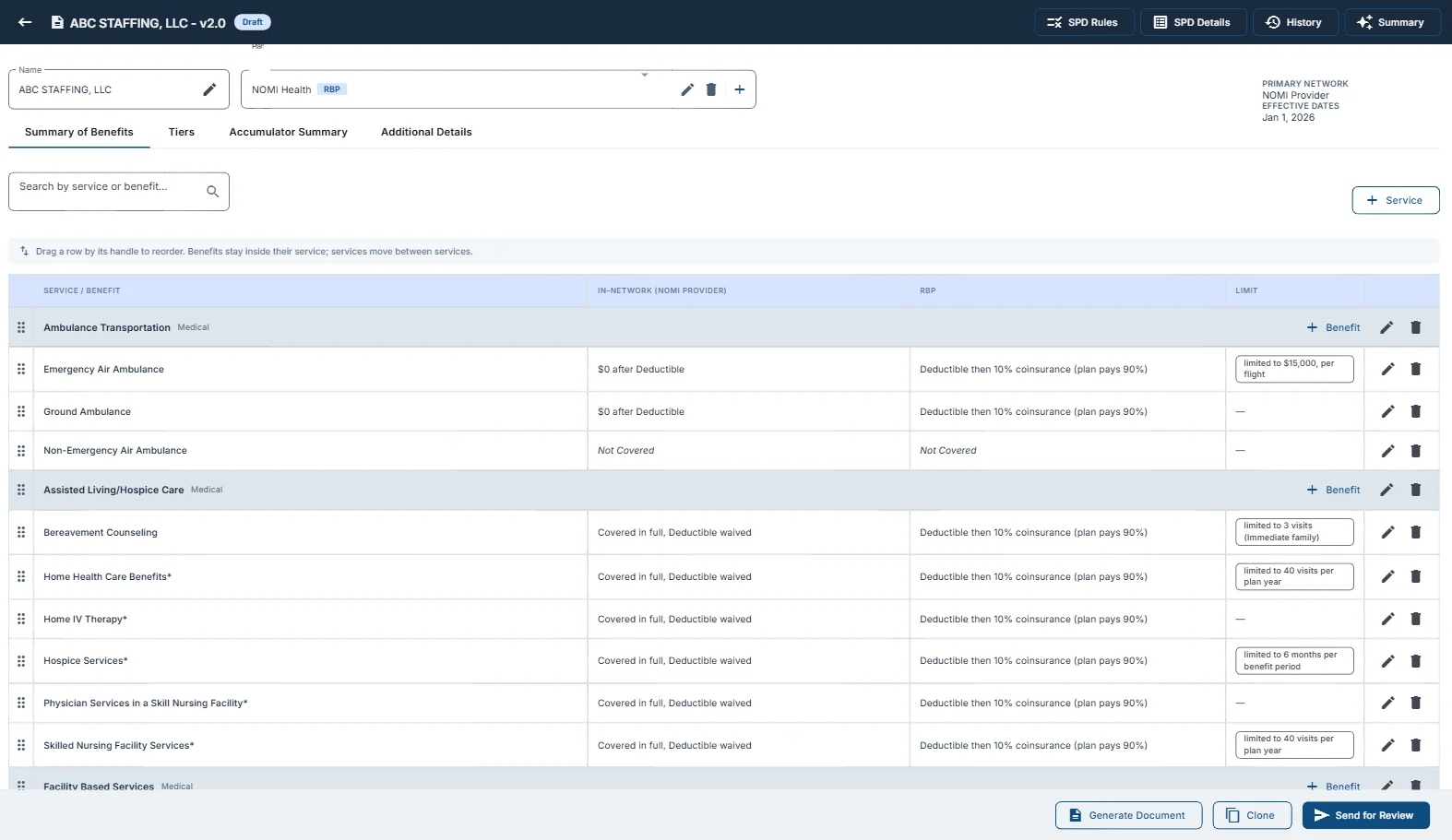
Edit cost share, tiers, benefits and rules directly. This is the plan itself, not a Word document.
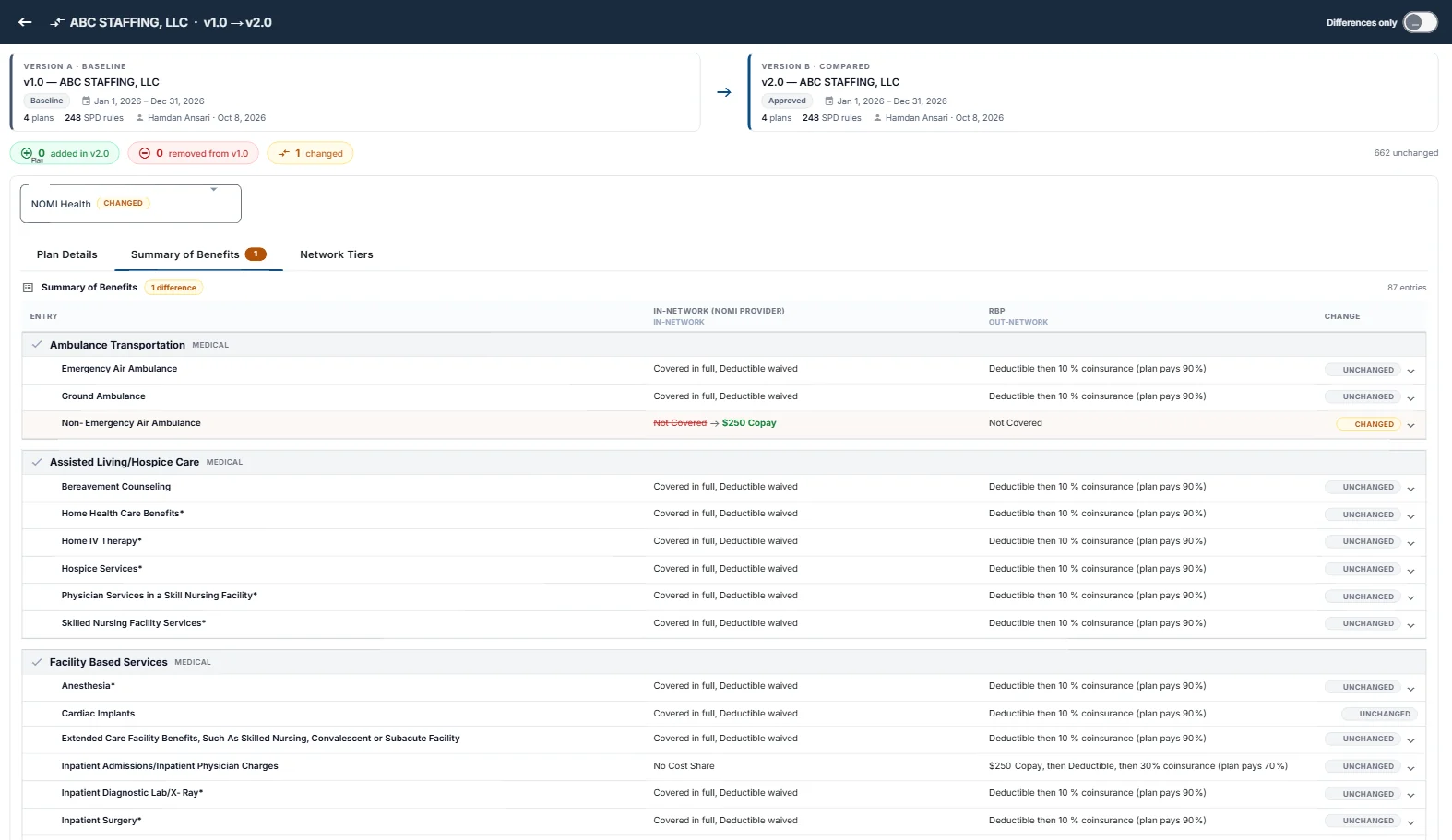
Every benefit, side by side across versions. The one real change, Non-Emergency Air Ambulance from Not Covered to a $250 copay, is flagged for you.
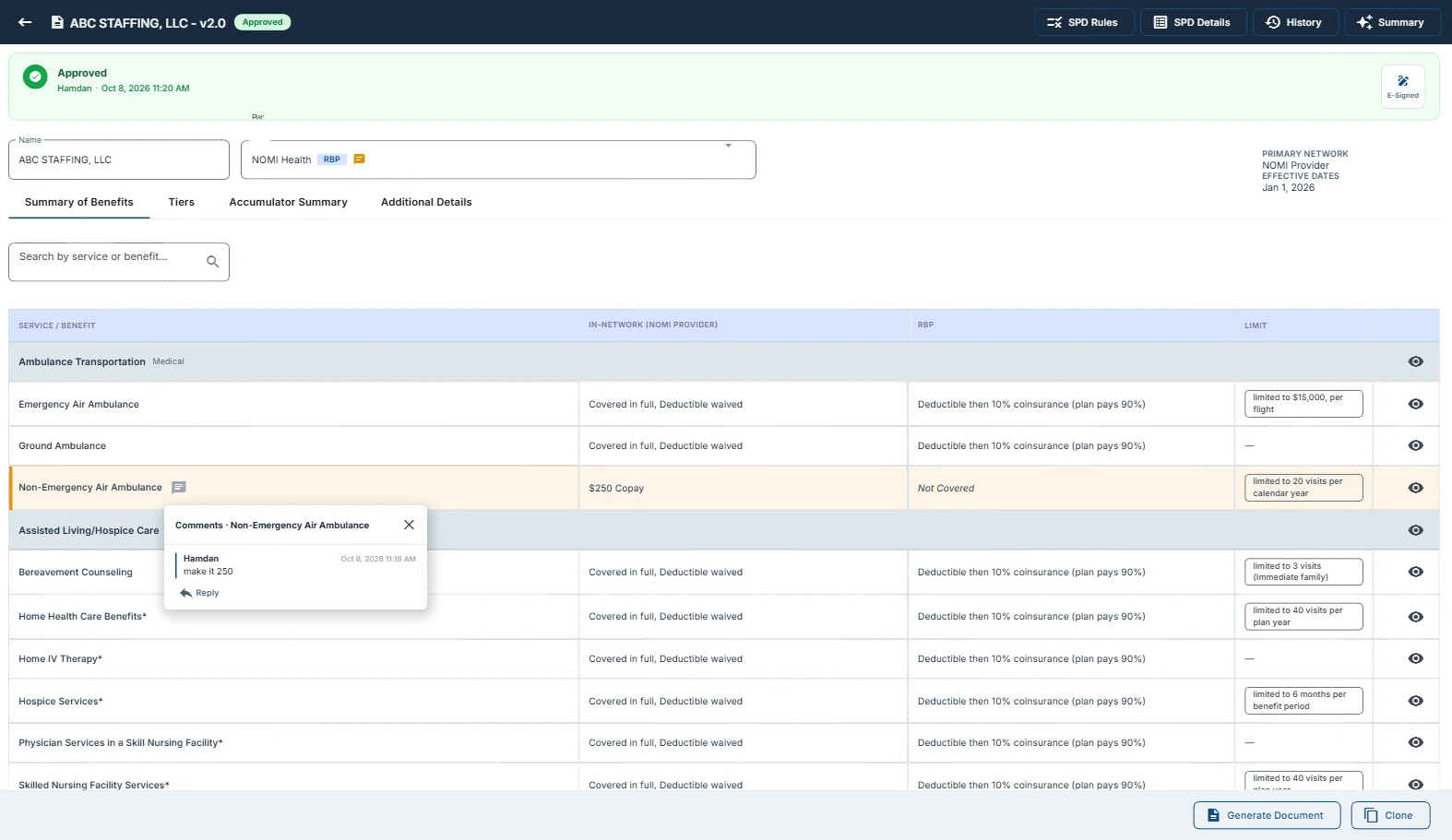
Reviewers comment on the exact benefit, and every approval is timestamped and e-signed. Nothing advances silently.
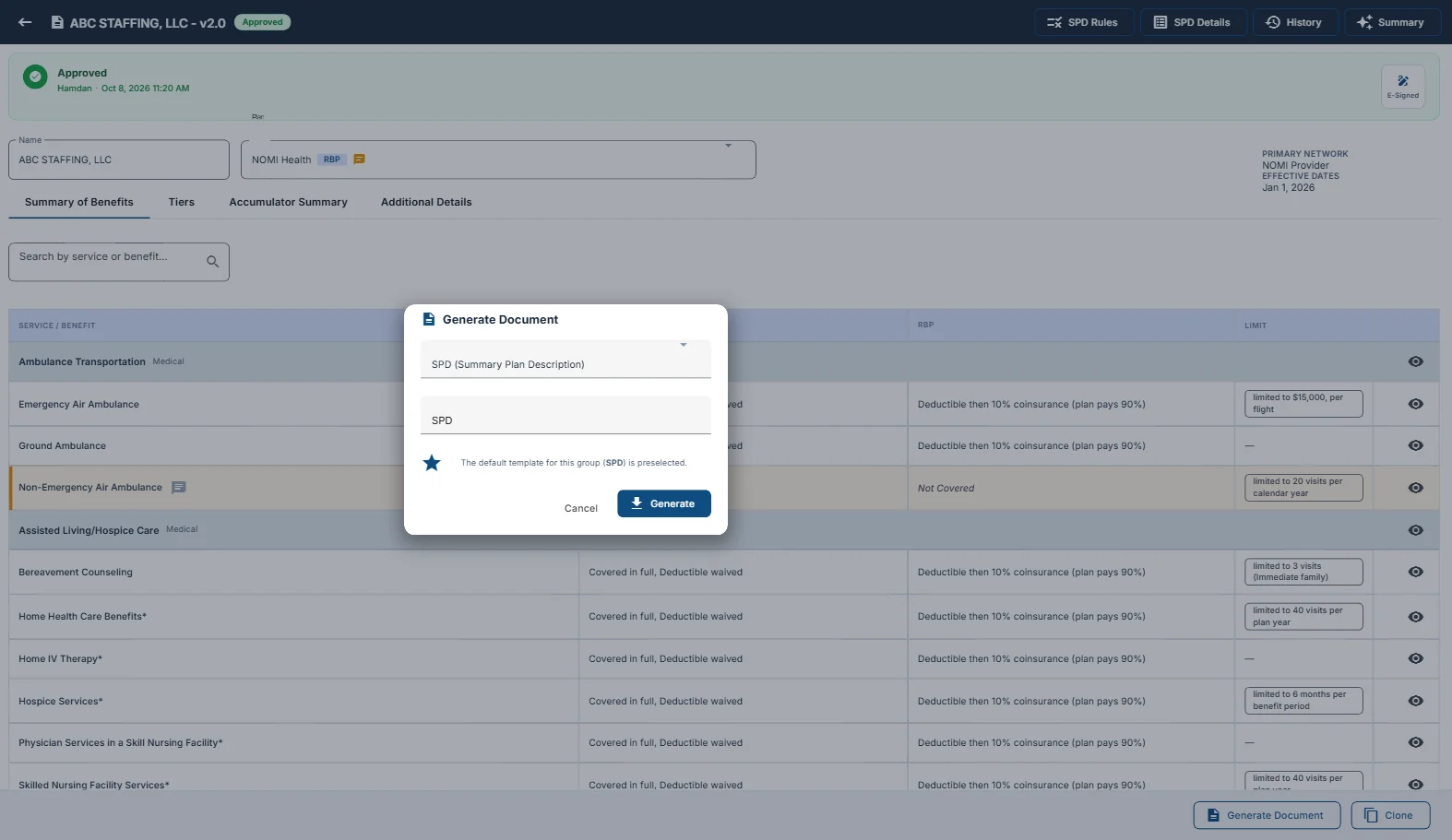
Pick the document type and template, then generate. The template controls the presentation. The plan controls the data.
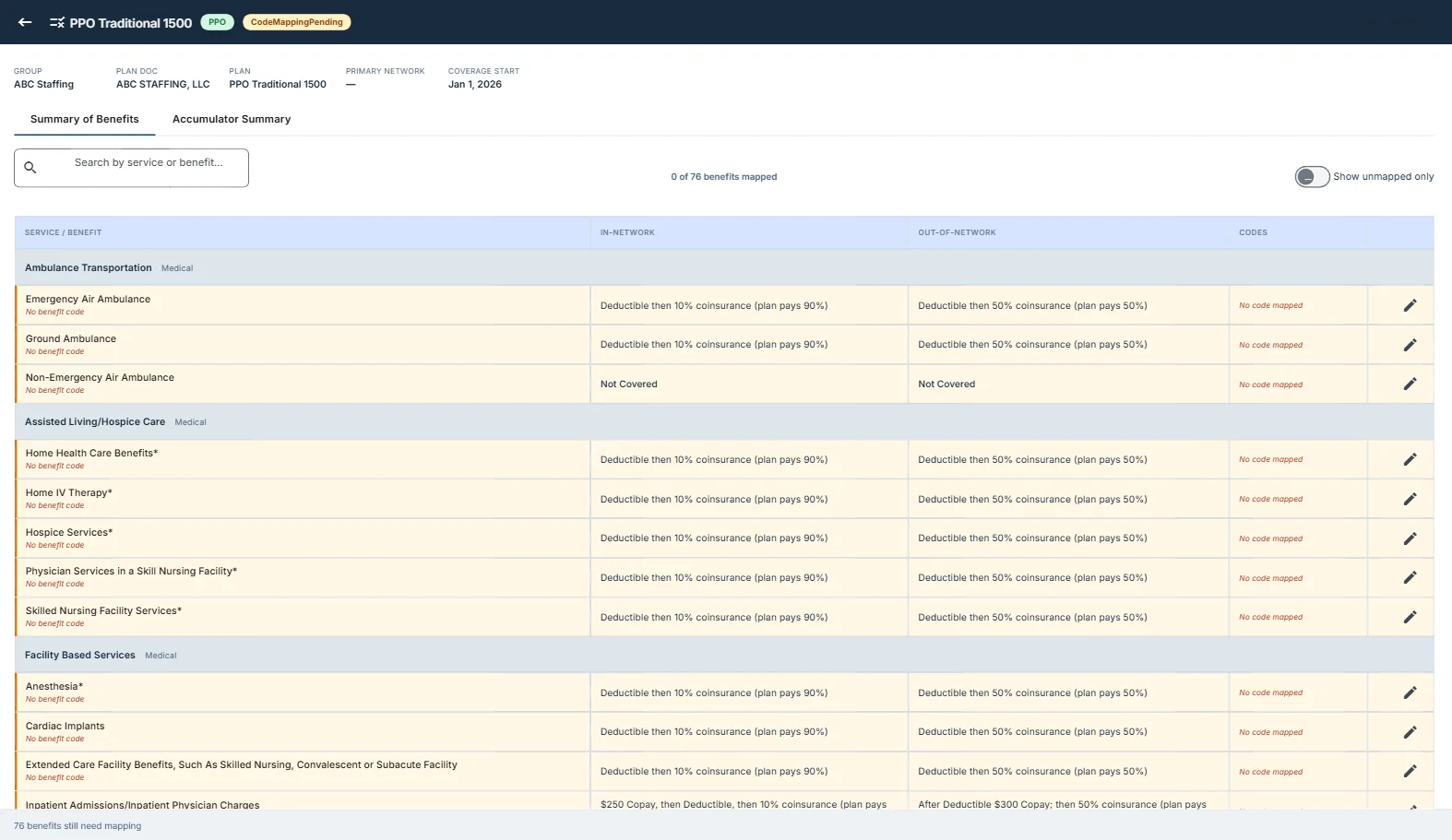
Every benefit shows whether it has codes yet. Unmapped benefits are flagged before the plan is built, not after it goes live.
Plan Doc Advisor
Ask the plan. Get the answer — with the exact page.
Instead of hunting through a 200-page PDF, ask Plan Doc Advisor in plain English. It reads the live, approved document and returns a precise answer citing the section and page that backs it up — in seconds, not minutes.
Plan Doc Advisor · ABC Staffing, 2026 SPD
Ready
Choose a coverage question
Each answer draws from the live, approved 2026 SPD — the same document adjudicators use, not a shared-drive PDF from last year.
Answer with citations
Choose a question on the left
The answer — with section and page citations — appears here.
Every answer cites the exact section and page. Your team goes straight to the source — no manual searching.
CSR Coverage Lookup
A member calls. Your CSR has the answer in seconds — not after 20 minutes on hold.
When a member calls to ask "is this covered?", your customer service rep selects the group, asks the question in plain English, and gets an answer sourced directly from that group's approved, current plan document — with the exact section and page that backs it up.
CSR Coverage Lookup
Ready
1 · Select a group
2 · Ask a coverage question
Coverage answer
Select a group, then ask a question
The answer — drawn from that group's approved plan — appears here with the page and section citation.
No more "let me check and call you back." The right answer for the right group's plan — in seconds, not minutes.
Claim Advisor
Real-time adjudication guidance — from the current, approved plan.
Because the plan is structured data, you can test it against claim scenarios during build and use it as a live reference during adjudication. Pick a claim and a plan version to see exactly how it resolves — and why.
Claim Advisor
Ready
1 · Select an example claim
2 · Validate against
Two approved 2026 plans for Acme Manufacturing. The same claim can land differently on each, which is exactly what you want to catch before the plan is live.
Plan rules checked
Validation trace
Decision
Nothing run yet
Choose an example claim on the left. The outcome, the plan rule that produced it and the AI second opinion appear here.
Your plan rules decide. The model advises. It can agree or raise its hand, never override.
AI, Where It Helps
AI does the heavy reading.
AI does the heavy reading.
Your team stays in control.
Smart Plan Doc uses AI to read existing plan documents, catch errors before they reach claims, answer coverage questions instantly, and surface things your team needs to see — without replacing the human decisions that matter.
- Processes a 178-page plan document in under 10 minutes — extracting 43 tables and 4 plans, structured and ready for review.
- Catches document errors before adjudication — malformed EINs, corrupted text, wrong page numbers, invalid phone numbers — flagged automatically on ingest.
- Answers plan questions in plain English, cited to the exact section — so a compliance question takes seconds, not a manual search through 200 pages.
- Provides a second opinion on adjudication, so your claim reviewers have a check against the current plan language — not a cached version from last quarter.
AI helps approve the plan, faster and more accurately.
It helps manage benefits, so your team isn't buried in manual updates.
The final decision stays with the people who own the plan.
Security & Auditability
Every change has a history
Every version, comment, approval, signature and publication is recorded against the plan. When someone asks what changed, who changed it and when it was approved, you have the answer.
Versions, edits, comments, approvals, signatures and publications each carry a timestamp and an owner.
Reviewers hold no standing account. One link, one person, one plan version, verified per session by a one-time code.
A separate workspace and a separate database per client organization. Nothing co-mingles.
Every request is signed and tied to the browser that issued it (DPoP, RFC 9449). A stolen token alone is useless.
Certifications and regulatory alignment
Decision Tree Consulting, which builds and hosts Smart Plan Doc, holds an independently audited SOC 2 Type II report covering Security, Availability and Confidentiality.
Encrypted at rest and in transit, role-based minimum-necessary access, and every action written to an audit log.
Every prompt is scrubbed of HIPAA-protected health information before it goes to AI for analysis. Member names, IDs, dates of birth and other identifiers never reach the model.
Version history, timestamped sponsor sign-off and plan-to-document traceability support the recordkeeping and disclosure practices ERISA and ACA plan administration require.
Free Savings Estimate
See exactly how much your TPA is leaving on the table.
Send us your estimate and we’ll review it with you. In a pilot, we measure real before-and-after results on your own plans. No obligation, no sales pitch.
- Personalized to your plan count & team size
- Response within one business day
- Trusted by TPAs and self-insured plans
Prefer to talk? Call us for a presentation at 855-669-4332
FAQ
Questions TPAs ask about Smart Plan Doc
Straight answers about what Smart Plan Doc does, who it is for, and how it handles your plan data.
What is Smart Plan Doc?
Smart Plan Doc is plan document management software for healthcare third-party administrators (TPAs). It turns existing Word (.docx) plan documents into structured, editable plan data, then handles versioning, employer review and approval, version comparison, SPD/SOB/SBC document generation, and moving approved plans into the claims environment.
Who is Smart Plan Doc for?
Smart Plan Doc is built for TPAs and plan administrators who manage self-funded employer health plans, along with the employers and brokers who review and approve those plans.
What software helps TPAs manage plan documents?
Smart Plan Doc is designed specifically for TPA plan document work. Instead of rebuilding plan documents in Word each plan year, TPAs keep each plan as structured data in one workspace, with a version history, reviewer comments and approvals, and generated documents that stay in sync with the approved plan.
How does Smart Plan Doc handle our existing Word plan documents?
Upload last year's .docx plan document. Smart Plan Doc's AI extracts the plan data (benefits, cost shares, network tiers, exclusions, eligibility, limits and prior authorization rules) into a structured plan your team reviews and confirms. Nothing goes live until a person approves it.
Can Smart Plan Doc generate SPDs, SOBs and SBCs?
Yes. You keep your own templates for Summary Plan Descriptions (SPDs), Schedules of Benefits (SOBs) and Summaries of Benefits and Coverage (SBCs). Once a plan is approved, Smart Plan Doc fills those templates from the approved plan data, so every document matches the plan.
How does Smart Plan Doc compare plan versions?
Version Compare puts two plan versions side by side and flags every added, removed and changed benefit, cost share and document rule, so renewal changes are clear without reading two Word documents line by line.
How do employers review and approve a plan?
The TPA sends the plan for review from inside Smart Plan Doc. Reviewers comment on the exact benefit they have a question about, and each approval is recorded with a timestamp and e-signature in the plan's approval history, replacing email chains and marked-up attachments.
Can I ask questions about a plan document in plain English?
Yes. Plan Doc Advisor answers coverage and compliance questions from the current, approved plan document and cites the section and page behind each answer. The AI Concierge gives customer service reps the same kind of sourced answer while a member is on the phone.
Does Smart Plan Doc connect to claims adjudication?
Yes. The Plan Build module maps each benefit to CPT, HCPCS, ICD-10 and CDT code ranges and validates coverage rules, so the approved plan can be used during adjudication. Claim Advisor shows how a claim resolves against a specific plan version, and why.
How does Smart Plan Doc protect health information?
Data is encrypted at rest and in transit, access is role-based, and every action is written to an audit log. Prompts are scrubbed of HIPAA-protected health information before they are sent to AI for analysis. Decision Tree Consulting, which builds and hosts Smart Plan Doc, holds a SOC 2 Type II report.
Does Smart Plan Doc support ERISA compliance?
Smart Plan Doc supports the recordkeeping and disclosure practices ERISA plan administration requires: version history, timestamped sponsor sign-off, and traceability from the plan data to every generated document. It supports compliance work but is not a legal compliance guarantee; final sign-off stays with your ERISA counsel.
Who makes Smart Plan Doc?
Smart Plan Doc is offered by Smart Claims Hub LLC of Tulsa, Oklahoma, and is built and hosted by Decision Tree Consulting, an enterprise application development firm in business since 2008.
How much does Smart Plan Doc cost?
Smart Plan Doc is offered as a monthly subscription. For pricing, call 855-669-4332 or request a demo.
How do I see a demo of Smart Plan Doc?
Call 855-669-4332 to schedule a presentation, or use the Request a Demo form on smartplandoc.com.