Feedback points at pages, not benefits
A comment like "change page 14" has to be traced back to the benefit it means, and the page may have moved since.
Every plan year needs sign-off from the employer and often from brokers, consultants and legal counsel. Smart Plan Doc sends each reviewer into the exact plan version, keeps their comments on the benefit they refer to, and records every approval with a timestamp and e-signature.
Reviews usually mean emailing documents to employers, consultants, legal and other approvers, then waiting, following up and repeating. Feedback comes back as marked-up files and replies that point to page numbers.
A comment like "change page 14" has to be traced back to the benefit it means, and the page may have moved since.
With several reviewers, it is hard to see who has approved and who is holding up the plan.
When someone later asks who approved the plan and when, the answer is buried in threads and attachments.
From inside Smart Plan Doc, send the plan version to employers, consultants, legal counsel or other stakeholders. Each reviewer gets a personal, secure link.
Reviewers need no account. They open their link and confirm a one-time code, which ties the session to one person and one plan version.
Reviewers read the plan and leave comments directly on the benefit rules they want changed, then submit their notes together.
Each reviewer either requests changes or approves. Requested changes go back to your team and the plan returns to review.
When everyone agrees, the plan is approved and electronically signed. The approval history, comments and version stay together.
This is the reviewer's side of the process. Open the link, comment on any benefit row, then request changes or approve.
Jordan, the 2026 plan document is in your approval queue. This link is personal to you, protected by a one-time code, and expires in 14 days. No account needed.
Protected by one-time verification so forwarded links can't be misused. Send to legal, plan sponsors, and actuaries simultaneously, each receives a unique link and independent audit trail.
Comment on any row. Notes collect on the right and submit as one batch.
| Service / Benefit | In-Network | Out-of-Network | Comment |
|---|
Here a benefits consultant has asked for a change to MRI / MRA Outpatient, while internal compliance and outside counsel have already approved. Once the change is resolved, the plan sponsor e-signs version 3.
Each comment stays attached to the benefit it is about, and each approval is timestamped. Nothing advances silently.
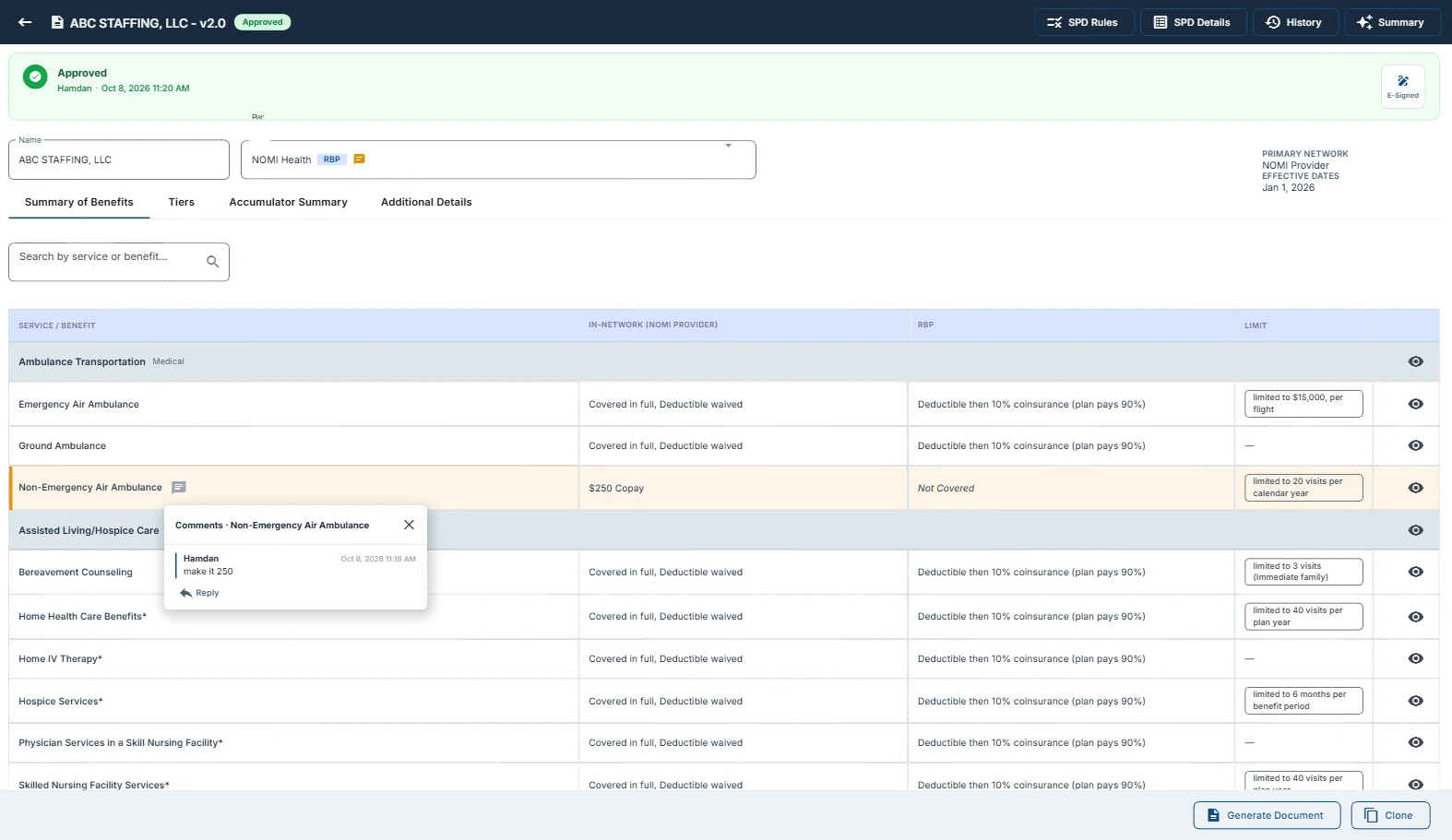
An approved plan in the product, with the e-signed approval banner and a reviewer comment attached to its benefit.
Reviewers comment on the exact benefit or rule. "Change page 14" becomes "change this benefit".
Comments, change requests and approvals stay centralized in Smart Plan Doc instead of spread across email.
See who has responded and who is holding up approval, while the review is still open.
Reviewers need no login portal or training. One link, one person, one plan version, verified by a one-time code.
Every approval is timestamped and e-signed, and the approval history stays with the version that was approved.
When changes are requested, the plan goes back to review with the comments attached, until it is approved.
The TPA sends the plan for review from inside Smart Plan Doc. Each reviewer opens the exact plan version, comments on the benefit they have a question about, and then requests changes or approves. Approvals are recorded with a timestamp and e-signature in the plan's approval history.
No. Reviewers hold no standing account. Each one gets a personal link to one plan version, verified per session with a one-time code, so a forwarded link cannot be misused.
Yes. You can send the plan to legal, plan sponsors and actuaries at the same time. Each reviewer receives a unique link and has an independent audit trail.
Their comments come back into Smart Plan Doc attached to the exact benefit, timestamped and attributed to the reviewer. Your team makes the changes and the plan goes back to review until everyone approves.
Request a demo, or call 855-669-4332 to schedule a presentation. We respond within one business day.