Changes hide across pages and tables
Benefits, tiers, cost shares, exclusions and limits are spread through a long document, so each one has to be checked by hand against the other version.

Every renewal and every amendment comes down to one question: what is different from the plan the employer approved? Smart Plan Doc compares two versions of the structured plan, not two Word files, and labels each benefit, cost share and rule that was added, removed, changed or renamed. Your team reviews the differences instead of hunting for them.
Today, checking a renewal usually means opening last year's SPD and this year's draft side by side and reading. Cost shares sit in tables, while limits, exclusions and prior authorization rules are written out in prose a few pages away. A copay that moved from $25 to $30 can sit on page 47, and nothing tells you whether you have found every difference.
Benefits, tiers, cost shares, exclusions and limits are spread through a long document, so each one has to be checked by hand against the other version.
When a benefit is renamed between plan years, a line-by-line comparison shows one item deleted and another added, and someone has to work out that it is the same benefit.
When someone asks what changed, who changed it and when it was approved, the answer is spread across file versions and email threads.
Upload the plan document you already have. Smart Plan Doc's AI extracts plans, tiers, benefits, services, exclusions, eligibility, limits and prior authorization requirements into a structured plan that your team reviews and confirms. That first version becomes the root version and is never edited.
Clone the last approved version to start a new plan year or record a mid-year amendment. Change cost shares, add or remove benefits, update tiers and modify rules. The changes are saved in the new version while the earlier one stays intact.
Open Version Compare with the two versions you need to check, such as the approved plan and the renewal draft. Every benefit lines up across both versions, at the plan, benefit and rule level rather than page by page.
Added, removed, changed and renamed items are called out with clear visual labels, so a cost share or rule update is in front of you instead of on a page someone might skip.
Once the differences are confirmed, send that version to the employer and other reviewers. Their comments attach to the exact benefit, and each approval is recorded with a timestamp and e-signature.
This example compares version 3 and version 4 of an Acme Manufacturing plan. The primary care office visit copay moves from $25 to $30, and the in-network annual deductible from $1,500 to $1,750. Virtual Behavioral Health is added, MRI Outpatient is renamed to MRI / MRA Outpatient, and the Routine Foot Care exclusion is removed.
Each difference carries its own label, so the reviewer sees the full set of changes in one place and nothing has to be pieced together from two files.
| Benefit | v3 | v4 |
|---|---|---|
| Primary Care Office VisitIn-network cost share | $25 | $30 |
| Annual Deductible, In-NetworkAmount | $1,500 | $1,750 |
| Virtual Behavioral HealthNew benefit | Not in plan | Added |
| MRI Outpatientnow “MRI / MRA Outpatient” | MRI Outpatient | Changed |
| Routine Foot CareExclusion | Excluded | Removed |
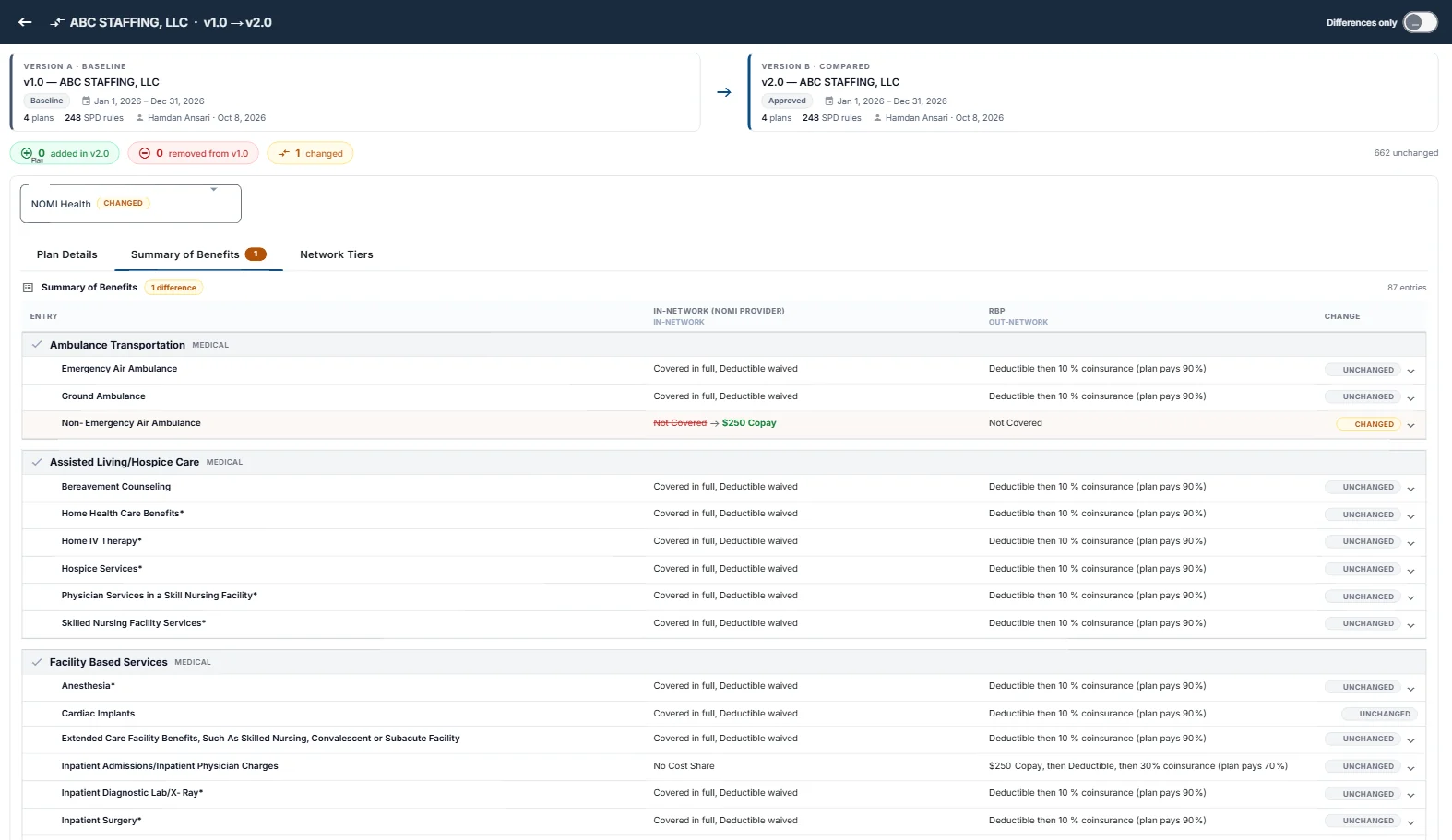
Version Compare in the product, with two versions of a plan lined up benefit by benefit. Only one benefit differs, Non-Emergency Air Ambulance, which goes from Not Covered to a $250 copay, and it is the one that is flagged.
The comparison works on the plan, its benefits and its rules, so you compare coverage, not the layout of two documents.
Added, removed and changed items are each called out, including changes to cost shares and document rules.
A renamed benefit is tracked as the same benefit with a new name, so there is no false "delete and add" pair to reconcile manually.
The root version from the original document stays untouched and every later version is kept, so a draft can always be checked against what was actually approved.
Versions, edits, comments, approvals and signatures each carry a timestamp and an owner, so what changed, who changed it and when it was approved is on record.
Once a version is approved, its SPD, SOB and SBC are generated from that same plan data, so the documents reflect the changes your team reviewed.
It lines up two versions of the structured plan and flags each benefit, cost share and document rule that was added, removed or changed between them. Because the comparison runs on plan data, nobody has to read two Word documents line by line to find the differences.
No. Renamed items are tracked as renames. In the example on this page, MRI Outpatient becomes MRI / MRA Outpatient and is labelled as changed, instead of appearing as one benefit removed and a new one added.
Yes. A mid-year amendment is saved as its own version of the plan, next to the version it changes, so the two can be put side by side like any other pair of versions.
The first version is created when Smart Plan Doc reads your existing .docx plan document and extracts the plan data, which your team reviews and confirms. That root version stays untouched. Later versions are cloned from an earlier one and edited, for example to start the next plan year.
Request a demo, or call 855-669-4332 to schedule a presentation. We respond within one business day.