Rekeying the plan a second time
Benefits and rules that were just approved are typed again into another system, with new chances for error.

An approved plan document is not the end of the work. Smart Plan Doc maps each benefit to the codes your claims system needs, validates the plan against example claims while it is still being built, and moves the approved plan into the claims adjudication environment without rekeying it.
Once everyone agrees on the plan, it still has to be translated into the systems that run it. That usually means reading the approved document and entering benefits, codes and rules into the claims system by hand.
Benefits and rules that were just approved are typed again into another system, with new chances for error.
It is hard to see which benefits still have no codes until a claim fails to match.
Without testing against example claims, a gap in the plan surfaces only when real claims are adjudicated.
Plan Build works from the same structured plan your team built, reviewed and approved.
Open the code mapping panel on any benefit, choose the code type, enter the code range, set coverage by network tier and attach the exclusion, eligibility, limit and prior authorization rules that govern it.
Unmapped benefits are flagged, a live counter shows how far the build has got, and the status changes from CodeMappingPending to Complete when every benefit is mapped.
Run example claims against the plan version with Claim Advisor to see how each one resolves, and why, before the plan goes live.
Move the approved plan into the TPA's claims adjudication environment, so the plan your team reviewed is the plan your claims system receives.
The benefits list shows every medical, dental and vision benefit with its in-network and out-of-network coverage and the codes mapped so far. Benefits with no codes are flagged, and "Show unmapped only" keeps the focus on what is left.
Click a benefit to open the mapping panel inline. Select the code type, enter the range, set coverage for each network tier, attach the document rules that apply, and mark individual codes as excluded where needed.
The pipeline moves the plan through code mapping, validation and the claims system to a live plan. In this example all 77 benefits are mapped and validation against example claims returned no errors.
Validation runs against example claim scenarios while the plan is still being built.
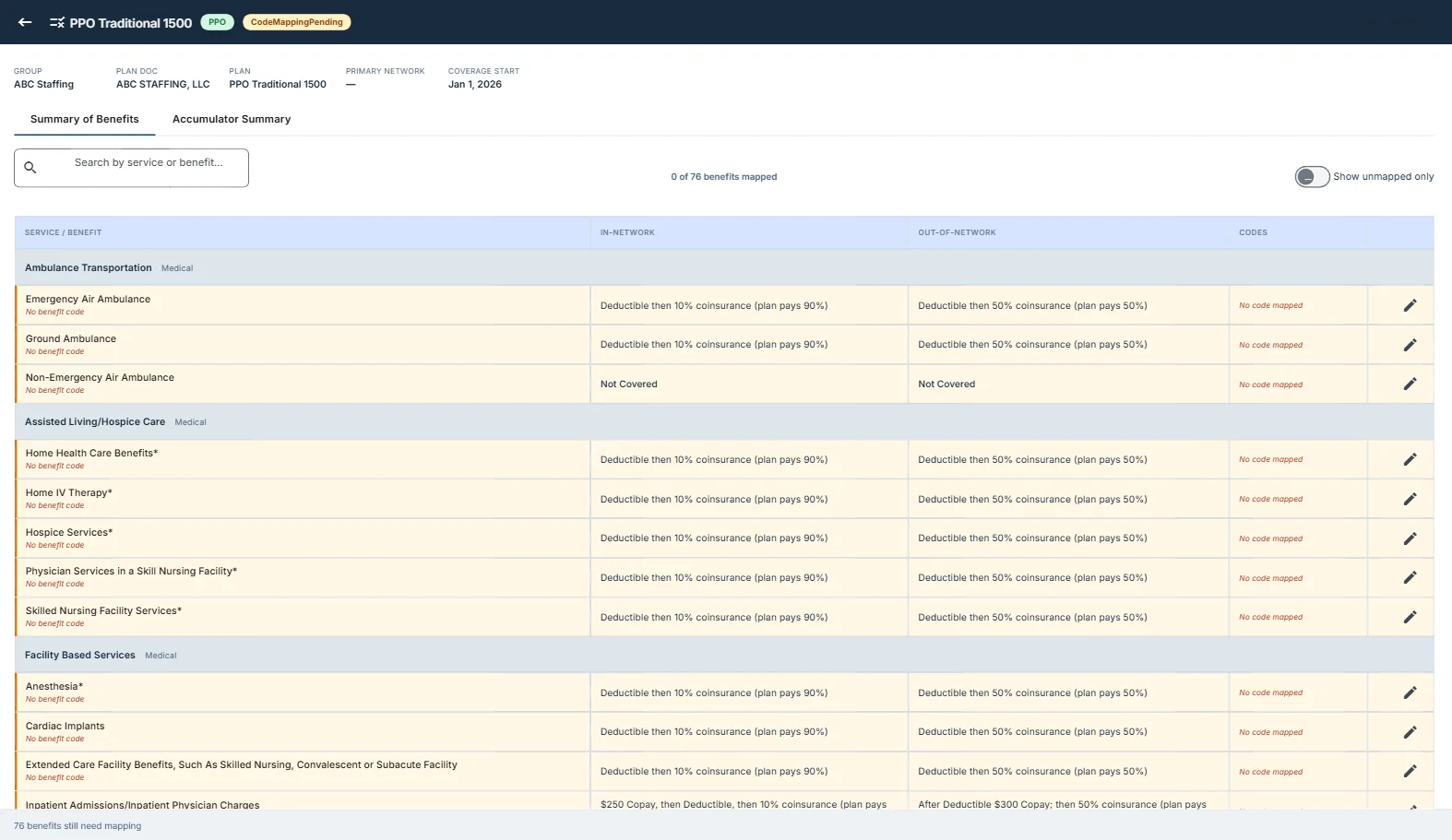
The Plan Build screen, listing each benefit with its cost share and code-mapping status. Unmapped benefits are flagged before the plan is built, not after it goes live.
Pick an example claim and a plan version. The same claim can resolve differently on two approved plans, which is exactly what you want to catch before a plan is live.
Two approved 2026 plans for Acme Manufacturing. The same claim can land differently on each, which is exactly what you want to catch before the plan is live.
The approved plan is built into the claims environment directly, without typing it into another system.
CPT, HCPCS, CDT, ICD-10-CM, MODIFIER and ESRDCB codes are mapped in a single panel, with code ranges covering whole procedure families.
In-network and out-of-network coverage is set per benefit at the code level, and specific codes can be excluded.
Exclusion, eligibility, limit and prior authorization rules from the plan document attach directly to each mapped code.
Unmapped benefits are flagged during the build, and example claims show how the plan resolves before it is live.
Claim Advisor gives an AI second opinion on each example claim. It can agree or raise a concern, but the plan rules make the decision.
Yes. The Plan Build module maps each benefit to code ranges and validates the coverage rules, so the approved plan can be used during adjudication. The approved plan is then built into the TPA's claims adjudication environment.
The code mapping panel supports CPT, HCPCS, CDT, ICD-10-CM, MODIFIER and ESRDCB code types. Each mapping row covers a code range, from and to, so a broad procedure family can be mapped in one row.
Each benefit is flagged until its code ranges are mapped and confirmed, a progress counter shows how many benefits are done, and a filter can show only unmapped benefits. The build status moves from CodeMappingPending to Complete when all benefits are mapped.
Claim Advisor runs example claims against a specific plan version and shows the decision, the plan rule that produced it and an AI second opinion. The plan rules decide; the AI can agree or flag a concern, but never overrides.
Request a demo, or call 855-669-4332 to schedule a presentation. We respond within one business day.