Copy the template, edit by hand
Every plan, tier, benefit and rule is updated manually in a new copy of the previous year's document.

Renewals and amendments change a plan that already exists. Smart Plan Doc lets your team clone the approved plan, make the changes at the benefit and rule level, and save the result as a new version while the original stays intact. Every version is kept, so you always know what changed and when.
In Word, each plan year starts as a copy of last year's document. Changes are typed into the text, older copies pile up in folders and email, and it gets hard to say which file is the approved one.
Every plan, tier, benefit and rule is updated manually in a new copy of the previous year's document.
Once a document has been edited, there is no clean record of exactly what the earlier version said.
Versions circulate as attachments, and tracking which employer has which version becomes its own job.
Your existing plan document is extracted into structured data and saved as the root version, which is never edited.
Clone the last approved version to launch a new plan year from your approved baseline, rather than a blank document.
Change a cost share, add a tier, modify an exclusion, update eligibility or change a prior authorization rule, at any level of the plan.
Changes are saved in the new version while the original remains intact. Mid-year amendments are recorded the same way, as their own version.
Send the version for review and approval, and compare it with any earlier version to see exactly what changed.
In this example the 2025 SPD was ingested as v1, the root version. v2 was cloned from it for the 2026 plan year and approved. v3 is a mid-year amendment that added a behavioral health benefit, also approved. v4 has been cloned from v3 for 2027 and is still a draft.
Inside the draft, the primary care office visit copay is being changed from $25 to $30. The approved versions underneath are not touched.
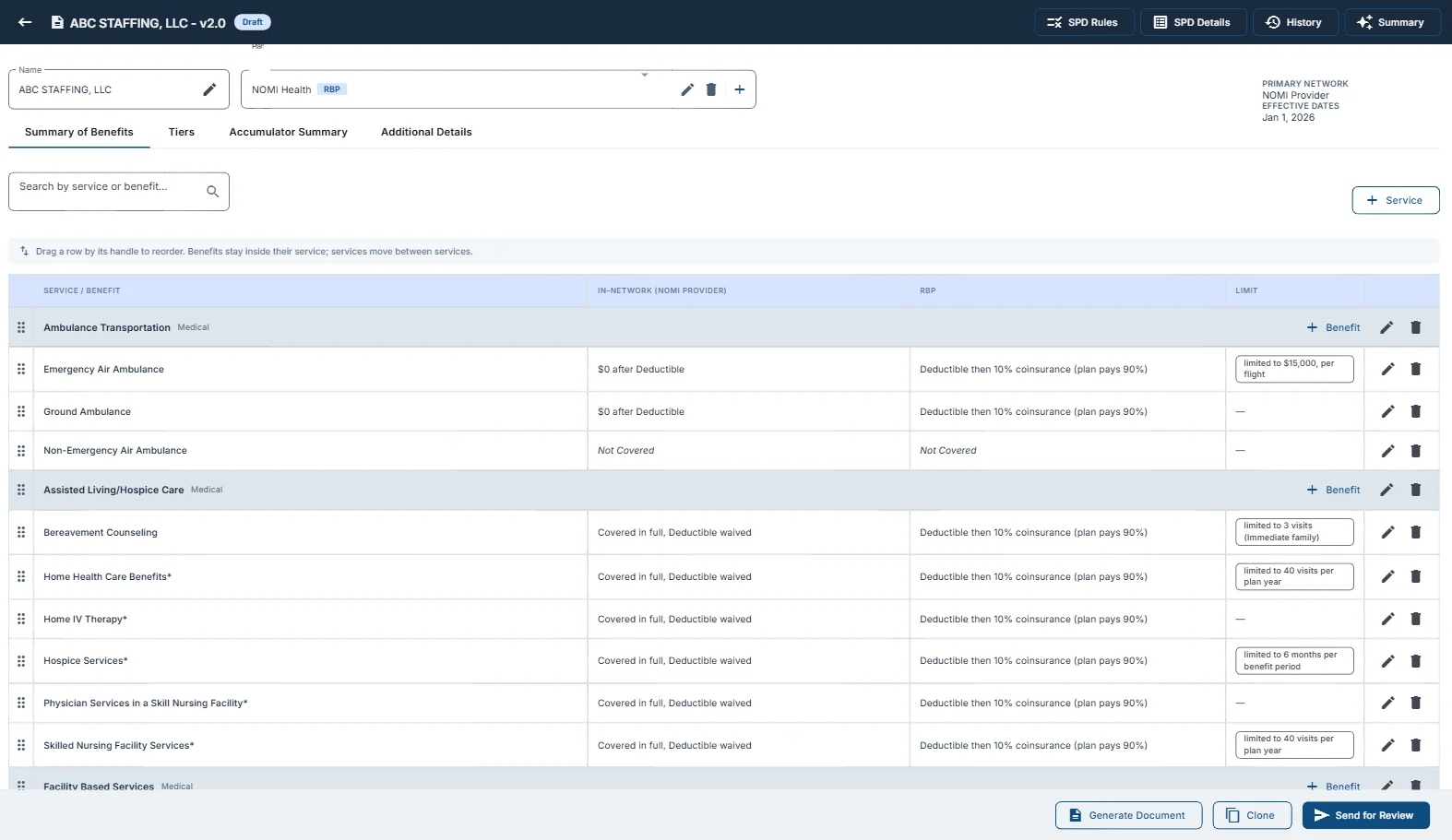
The Plan Editor, where cost shares, tiers, benefits and rules are edited directly. What you change is the plan itself, saved as a version, not a Word document.
Cloning the last approved version means the new plan year begins with everything that was already agreed.
Change an entire plan structure or a single copay or rule, without rebuilding a document.
The root version stays untouched, preserving a permanent record for compliance and auditing.
Mid-year amendments are their own versions, so the history shows what changed during the year as well as at renewal.
Versions and edits carry a timestamp and an owner, alongside the comments, approvals and signatures for each version.
SPDs, SOBs and SBCs are generated from the approved version, so the documents match the plan that was signed.
Clone the last approved version of the plan. The clone becomes the new plan year, and your team changes cost shares, tiers, benefits and rules in it while the approved version stays exactly as it was.
Anything in the plan, from the overall structure down to a single copay or rule. That includes cost shares, tiers, benefits, exclusions, eligibility and prior authorization rules.
The root version is the plan as it was first extracted from your original document. It is never edited, so it stays a permanent source of truth for compliance and auditing.
Yes. Versions and edits each carry a timestamp and an owner, and Version Compare puts two versions side by side so every added, removed and changed item is flagged.
Request a demo, or call 855-669-4332 to schedule a presentation. We respond within one business day.